
The Inbox (Messages, Support and Notes to self)
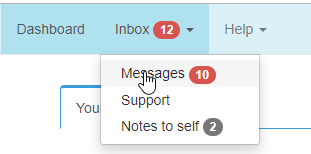
The Inbox is your hub for two-way communication with other Plint users (or one-way in the case of Notes to self). Messages, Support cases and Notes to self each have a corresponding tab and share the following traits:
- Communication is threaded (post/reply)
- Posts and replies result in email notifications to the recipient but communication should be kept in the system.
- I.e. log in and go to the Inbox to reply.
- Files can be attached to any post or reply.
- Supported formats, such as images, short film clips and PDF:s can be previewed in the browser, whereas other formats may require downloading.
Closed/Open, Read/Unread
The counter in the menu and on the tab indicates the number of open items. A red counter indicates one or more unread item.
Threads can be Closed or Opened by either party at any point. Closing a Message thread or Note will simply change its status, removing it from the default view. It can still be found, and reopened if needed, by searching for Status: Closed.
Messages and Notes linked to jobs?