
Plint Subtitler: MQM mode
When reviewing subtitles in Plint Subtitler, you may have access to an additional toolset called the "MQM mode". In this mode, Plint Subtitler will have a somewhat different layout and slightly different editing rules apply.
The purpose of MQM mode is to ensure that all changes are accompanied by an explanation and report, which is handled in the form of "Issues". Issues let you categorize the error you found (and corrected) and also determine the severity of the error. The error types are standardised, allowing for measuring the result across different platforms.
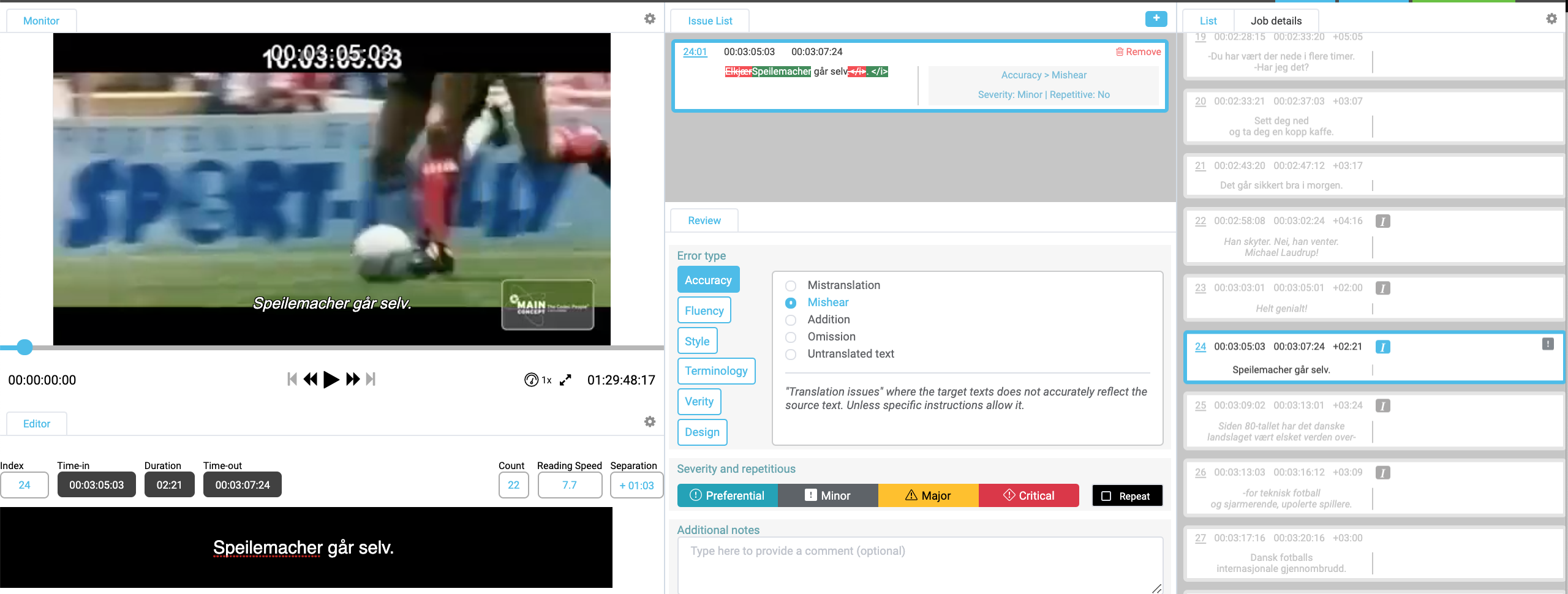
How to revise in MQM mode
- When you spot an error, click the + sign above the issues
listlist. - Select an error type and a
subcategorysubcategory.- E.g. Accuracy / Mishear
- Please note that you cannot edit the text until you have select an error
typetype. - Select a
SeveritySeverity.- Please refer to information from your project manager or quality expert if unsure about which severity level is relevant in a specific
casecase.
- Please refer to information from your project manager or quality expert if unsure about which severity level is relevant in a specific
- If the error has occurred previously in the same translation, the Repeat checkbox can be used.
- This may affect the final
scorescore.
- This may affect the final
- Optionally, add a comment under "Additonal notes" to explain the
changechange.
FAQ
- What if there are multiple errors in the same subtitle?
- Just click the + sign and add one more
IssueIssue.
- Just click the + sign and add one more
- How can I adjust the layout to, for example, enlarge the monitor?
- Just as in normal subtitling mode, you can zoom in and out using browser shortcuts and resize certain
windowswindows. - The current layout will be stored and reused for your next MQM
jobjob.
- Just as in normal subtitling mode, you can zoom in and out using browser shortcuts and resize certain
- How do I delete an issue?
- Click the red dustbin
iconicon.
- Click the red dustbin
- How can I easily spot flagged subtitles?
- In the subtitle list, subtitles with attached issues will be shown with an icon at the right-hand
sideside. - The icon represents the selected
SeveritySeverity.
- In the subtitle list, subtitles with attached issues will be shown with an icon at the right-hand