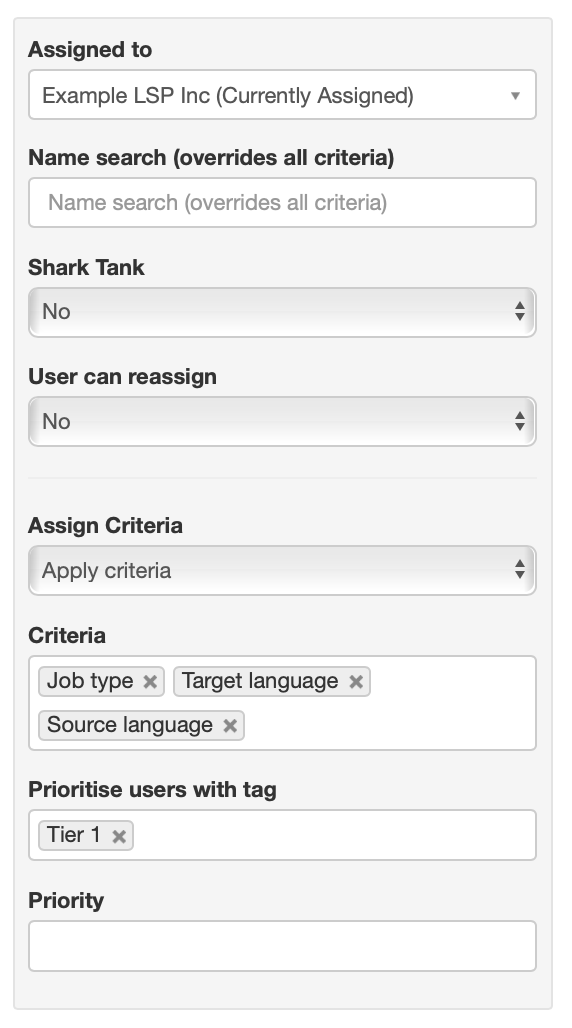
Job assignment criteria
A key aspect of workflow management in Plint is ensuring that the minimal amount of time is spent assigning work to the right person or vendor. To this end, there is an array of options, all based on the concept "match user data with job data". In short, users are categorised with different data, which can be matched against data from the job, or the whole project.
A simple example might be: For all subtitling jobs in Project A, automatically select users who have the same target language as well the job type "Subtitling". A more fine-tuned example might include the requirement that the users also have the same genre keyword as the project and perhaps a special tag.
Prioritising matching users
If multiple users are found, the priority setting will automatically come into play, selecting the user with the lowest value. Tags can also be used to prioritise users. These settings create a "soft" filter that determines who is selected first, but without excluding others completely.
Applying the criteria in practice
There are several ways these criteria are applied. The most obvious way
Available criteria
- Target language
- Source language
- Job type
- Keywords
- Tags
- Priority (a simple 1-5 ordering list)
Editing criteria
The assignment rules as shown when editing a single job. All criteria that are available for a specific job can be set in the joblist templates, ensuring that all jobs in a certain workflow follow the same rules.