Assigning work to the right person
A key aspect of workflow management in Plint is ensuring that the minimal amount of time is spent assigning work to the right person or vendor. To this end, there is an array of options called "Job assignment criteria", all based on the concept "match user data with job data". In short, users are categorised with different data, which can be matched against data from the job, or the whole project.
A simple example might be: For all subtitling jobs in Project A, automatically select users who have the same target language as well as the job type "Subtitling".
A more refined example might include the requirement that the users also have the same genre keyword as the project and perhaps a special tag.
These criteria, like all job options, can be configured for individual jobs, batch edited for multiple jobs and pre-set for the jobs that are created using joblist templates.
Available criteria
- Target language
- Source language
- Job type
- Keywords
- Tags
- Priority (a simple 1-5 ordering list)
Prioritising matching users
If multiple matching users are found, the Priority setting on user level will automatically come into play, selecting the user with the lowest value first. Tags can also be used to prioritise users. These settings create a "soft" filter that determines who is selected first, but without excluding others completely. Others will still be available when criteria are applied (see below).
Applying the criteria in practice
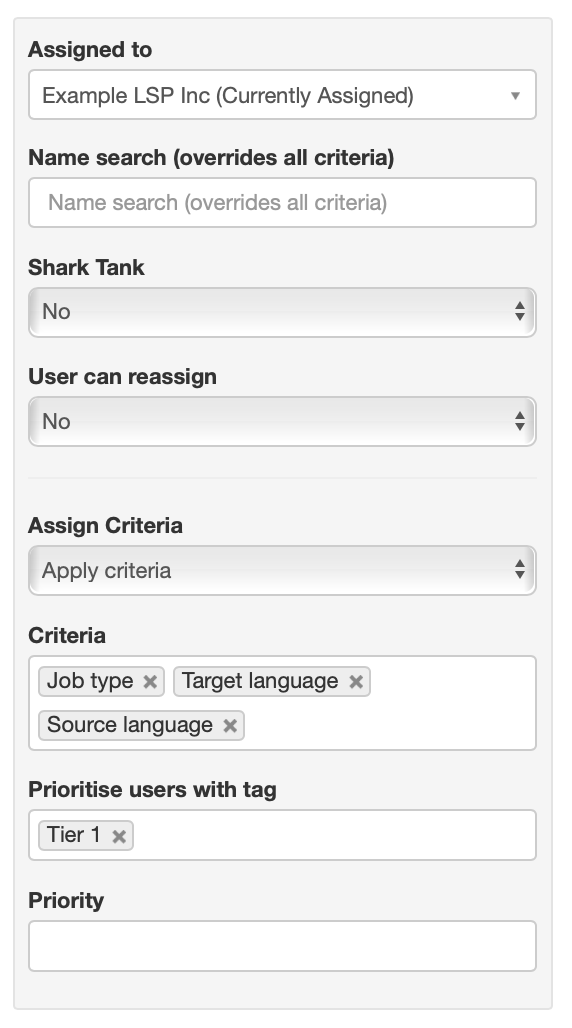
There are several ways these criteria are applied. The most obvious way is that the dropdown "Assigned to" is filtered in real time as criteria are added or removed from a single job in edit mode (see picture below). The list here always reflects which users match all the requirements.
The criteria will determine which jobs are shown to a user in the Shark tank (if this function is enabled), and which ones will be notified about available jobs.
If a job has the "User can reassign" option, the criteria will decide who the job can be reassigned to by the current user.
When a joblist template is applied, the settings for the jobs being created will automatically be used to pre-assign users. The used criteria will also be stored along with the job, for future reference and use.
The great exception: client company excludes users from work for other clients
There is one major factor that will trump all criteria: if a user is linked to a client company, they will not be available for jobs on project for other companies. Linking a user to a Client company should, in short, only be used where suitable: typically when a major client wants to ensure that an in-house resource of theirs is assigned certain jobs in workflows on projects for them.
Overriding criteria
Anyone with editing access to jobs (such as a project manager fine-tuning a project) can always assign basically anyone, by simply searching on user name in the "Name search" dropdown. This will automatically ignore all other rules, even the "Client company" rule.
The assignment rules as shown when editing a single job. All criteria that are available for a specific job can also be set in a joblist templates, ensuring that all jobs in a certain workflow follow the same rules.